UPDATE: This is what it sounds like :D
We Won't Get Fooled Again [Intro Sound] by Paolo Montesel
SOFTWARE NEEDED:
- Reaktor (You should be able to recreate the same patch in similar modular synth software and even on your average keyboard with 2 LFO… It can also be emulated with 1 LFO and 1 arpeggiator)
- Plogue Bidule (That is, a modular VST host… just because it is much more flexible than ordinary hosts, but any decent host with insert effects could do)
- Some kind of Organ/Hammond VST (even crappy :D)
There’s some nice open source modular synth out there (ALSA Modular Synth, Ingen, etc…) and they can do what I do in this tutorial, but I’m not using them since they are quite instable and incomplete.
BIDULE PATCH
First of all, let’s create the Bidule patch and later we will focus on the Reaktor part:
 The image is pretty self-explanatory but I’m gonna explain it anyway:
- UMX 49 – This is my USB Keyboard and is used as a MIDI input device
- B4 II – Hammond VST
- Reaktor5 – Native Instruments’ masterpiece ;)
- Mixer – In this patch it is useless, but it’s there by default :D
- ASIO4ALL – ASIO (low latency) audio output. Be sure of using an ASIO driver or you’ll be getting weird sounds (in Windows)
Aka “What’s going on in the song?”
Well it’s pretty simple. There’s the Hammond-like sound being put on and off something like 4-5 times a second and this is achieved by modulating the amplification of the organ with a square wave with values 0-1.
Then there is a low pass filter controlled by a sinusoidal LFO.
Yeah, I told you, simple.
REAKTOR
ON/OFF
First of all, we create the on/off effect: 1:
1:- “Tempo Info” is an object that give us the Beats Per Second setting of Reaktor, so if you take the inverse of it we get the frequency of the current tempo. “Mod Multi” is a Knob with step set to “1” and is used as a frequency multiplier (the multiplication is the “X” object). The point of having knobs is to make it easy to change parameters of the patch and tweak them easily.
- The LFO (Low Frequency Oscillator, an oscillator that works at low frequencies) takes the frequency calculated and output a square wave (The output port is called “Pls” due to “Pulse”, another name for square wave) with amplitude 0.5, so we get a wave oscillating between [-0.5, 0.5].
- The last block is simply adding 0.5 to the wave so we get it to oscillate between [0, 1]
- This isn’t a necessary step, but since the square wave contains a lot of high frequencies we get some “clicks” in the sound. So we simple filter it with a low-pass filter (LPF) and we get a square wave that is “less squared” :).
- “Square Flt” is another knob.
- “Log” is a Reaktor object used to turn a “frequency” signal to a “pitch” signal. If your modular synth uses plain freq signals you can avoid this.
- This is the easier block of the patch.
- The 2 “In” are the audio inputs. The 2 “Out” are the ouputs.
- “X” is, again, the multiplication.
- Now we can press some key on our MIDI keyboard to hear how it sounds. Adjust the knob value as you want (for the filter knob I have 100, the other should be as accurate as possible to the original track).
LFO-CONTROLLED LPF
 1:
1:- This time we are gonna use a sinusoidal wave so we connect the “Sin” output of the LFO. “LFO Freq” and “LFO Amp” are knobs (See the last snapshot to see some nice values to start with to create your own sound).
- Here we have 2 knobs. The first, “LFO Filter Res”, is the parameter used to set the LPF resonance (if you don’t know what it is just play a bit with the knob and hear the difference… for the technical explanation Google something like “resonant low pass filter”).
- LFO Offset is added to the LFO output to get values between [Offset-Amp, Offset+Amp] otherwise we would get the sound filtered way too much.
- Both the signal are then converted to pitch signals used to control the 2 filters (one for the left channel, the other for the right one).
- Instead of connecting the stuff from the first part of the tutorial directly to the outputs we insert two LPF controlled by the LFO in 1.
FINAL PATCH AND PANEL

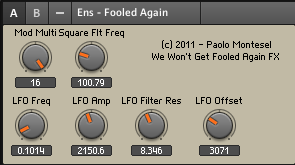 The “Mod Multi” knob value is totally wrong because the last time I opened this patch I played a bit with it ;).
FINAL WORDS
Now you are ready to have fun playing We Won’t Get Fooled Again :) Feel free to drop a comment if you need some help. I’m not gonna upload the final patch since I want you to do it with your hands and learn something :P
I should definitely try to do this in ALSA Modular Synth or Ingen, but these two softwares are way too instable… Ingen looks promising and I’ve been using it for some tests but from the SVN activity I saw it’s no longer actively developed. Too bad, someone should take the duty of doing some serious bug-hunting, develop it in the area where it lacks features and package it for the major Linux distribution (Ubuntu Maverick doesn’t include it in the official repos) because it could become the defacto open source modular synth.
I really hope the open source audio community will be able to fill the gap with Windows and Mac since I’m a huge Linux user/fan… Trust me, I tried hard to do some serious audio stuff in Linux but when I tried to do something more than the basic stuff I could not find the proper software. Ardour is amazing but it needs some improvement on the plugin/sidechaining part.
I dunno why but on Windows I get no clicks (xrun in jack’s jargon) while on Linux I get some clicks in the audio even if I lower the audio quality and all…
P.S.: I’m not a Reaktor guru so it’s probable that there are easier ways to get the job done, but I don’t know them :D

